
Stellic’s reporting functionality allows you to identify student populations who meet certain degree audit criteria, such as courses not taken and unmet requirements. Use the Student Search page filters to create a student list.
The Demographics filter narrows your options when accessing a broad student population. The chart below outlines available search types in the Demographics drop-down.
| Criteria | Context |
|---|---|
| Enrollment level | Graduate, Law, Medicine, and Undergraduate. (Non-degree student records are not present in Stellic.) |
| Class level | Relevant for undergraduate students only |
| Campus | Tallahassee, Panama City, Republic of Panama |
| Entry year | Year |
| Entry term* | Student’s admit term and year |
| Catalog term* | Student’s program requirement term for university-wide requirements. (Not relevant for graduate and professional programs.) |
| Department(s) | Type ahead to find your department, school, or college |
| School | Choose from a list of FSU colleges |
| Student Tags | Type ahead to find your value(s) |
*A student’s entry term/year is the term of their admission/readmission. The catalog term reflects the set of requirements the student is subject to; typically, it is the same as the entry term/year. If you have a question about a student’s assigned catalog term/year, consult your dean.
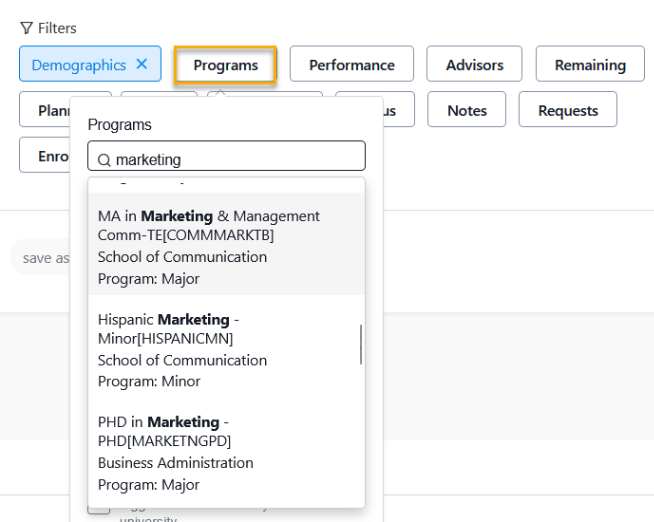
Using the Programs criteria is an additional method for refining and focusing on specific student populations. Stellic offers both undergrad and grad options; for example, choosing "Marketing" may display results for graduate programs in different colleges as well as undergraduate majors and minors. Be cautious when making your selections.
Save your search criteria as a report by clicking "save as report" below the results header. Name it for quick access in the Saved Reports section. This creates a one-click search, saving time on repeated filtering.
Stellic users highlighted additional filters they find essential.
| Filter | Context |
|---|---|
| Performance | Overall GPA |
| FSU GPA | FSU GPA - can be found under "more options" |
| Remaining | Specify courses or non-course requirements yet unmet |
| Planned | Number of courses in plan, registration status, specific courses in plan Plan review status Expected graduation (term/year) Plan warnings: Planned course not offered, Prereq/Coreq not met, Semester overload, Schedule conflict |
| Taken | Number of courses taken, specific courses taken, specific requirement Exceptions |
| Academic Standing | Good standing, Dismissed, Reinstated after dismissal, Probation |
| Map term | Relevant for undergraduates only; can be found under “more options” |
| Map status | Relevant for undergraduates only; can be found under “more options” |
The above list is not exhaustive. To learn more about reporting in Stellic, refer to the Student Search section of the knowledgebase. Refer to the Glossary for help with terminology. If you have ideas for reports that don’t require degree audit information, consult the Office of Institutional Research for assistance identifying the appropriate PowerBI dashboard.