When will I use Stellic?
Stellic can be used throughout your time at FSU to monitor degree progress, plan ahead, and register for classes.
Why am I getting a "Stellic is not available to you yet" message?
Admitted undergraduates access Stellic during Orientation; graduate admits gain access within a week of classes starting, once their department has gone live in the platform.
When will Stellic be available for my graduate program?
Please refer to our
Phases page.
I'm currently enrolled as a graduate student. Will I be notified when Stellic is available to me?
Yes, by email.
I'm having trouble logging in. What should I do?
Non-degree students cannot access Stellic. If you're a degree-seeking graduate student and the go-live date for your department has passed, try updating your browser, clearing history, enabling cookies, and disabling pop-up blockers. Still unable to log in? Submit a ticket to the
Service Desk.
How can I search for online courses in Stellic?
Select the "Year/Semester" button, then "Select Delivery Mode." Search for "fully online" delivery. "Mostly online" classes may be up to 20% face-to-face.
Can I block off time on my schedule for non-course activities?
Replace existing answer text with: Yes, you may add extra-curricular or other activities to your plan and/or to your weekly schedule for a given semester. The
Add Activities to Your Plan page contains detailed instructions.
How can I view all sections of a course for a term including the ones that are full?
Some classes may appear with zero seats available if they are full or if seats are being reserved for students in other majors or special programs. To view the full sections of a course, change the Availability filter in the Course Search from "Only show courses with open seats" to "no restrictions".
How do I verify in Stellic if a course has prerequisites?
Search for the course in the Course Search or the Explore Courses tab. Click on the course and scroll down to the section titled Prerequisites or Additional Prerequisites. Contact the department offering the course if you have any questions about the prerequisites listed.
Can I declare or change my major in Stellic?
No. While undergraduates can model different majors and minors in Stellic by adding programs, this is only a what-if view for planning purposes. To officially change your major, you must contact the academic advisor in that department for instructions.
How can I declare an area of concentration or specialization for one of my programs in Stellic?
You can unofficially declare your concentration in Stellic for the purpose of course planning. In your Track Progress page, scroll down to the concentration requirement for your major and click the arrow to expand it. From the list of concentrations, click the Not in Plan button beside the one you want to choose and then click Add Concentration.
Concentrations added in Stellic will appear as undeclared and will be visible only in the Planned view of the audit. Contact your advisor for information on how to officially declare your concentration in Student Central.
How can I swap one class for a different one?
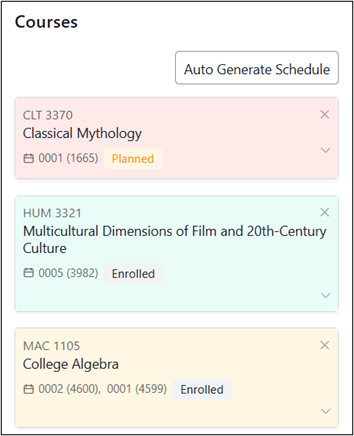
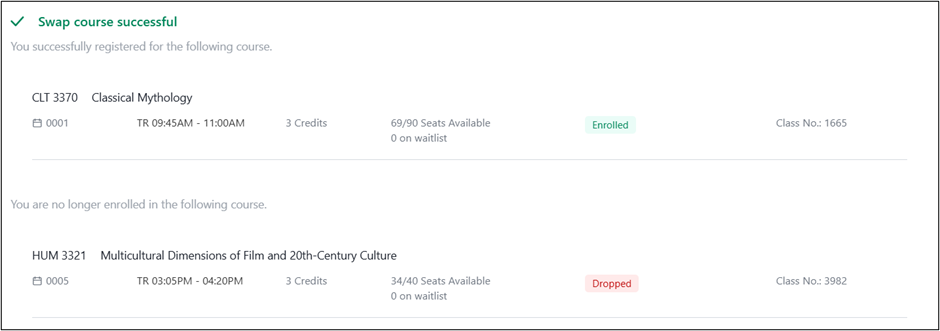
The Stellic swap function will allow you drop one class and add a new one in the same transaction. The example below describes how to perform a swap in the system for a student who is wanting to drop HUM3321 and add CLT3370 at the same time.
Step1: In the Scheduler component of Stellic, add the specific course and section of the course you want to add (CLT3370-0001) to your schedule into your Plan. The class will have the note Planned.
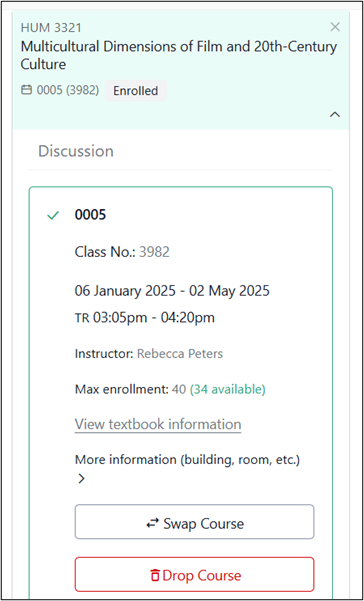
Step 2: Click on the class tile for the course you want to drop (HUM3321-0005). In the section information, click the Swap Course button.
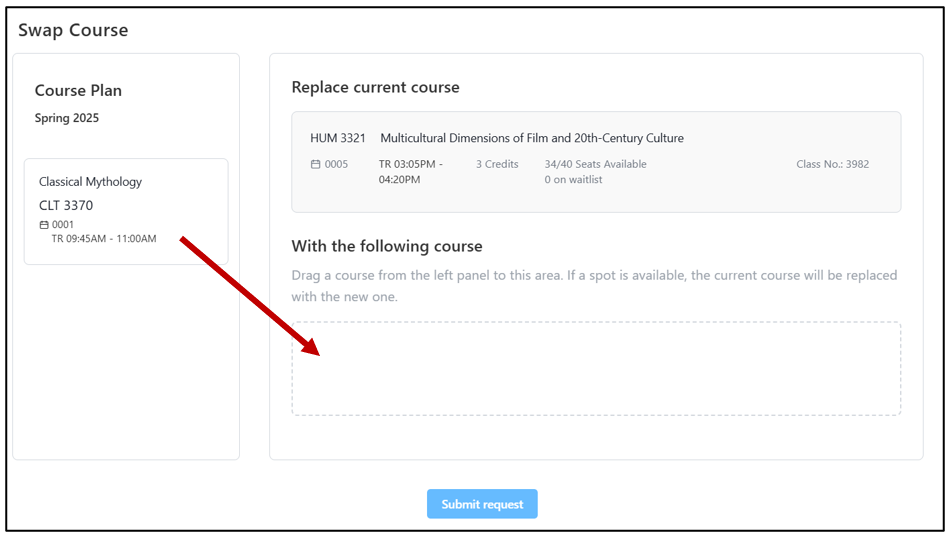
Step 3: On the Swap Course page, drag the class you want to add from the Course Plan panel to the box beneath With the following course.
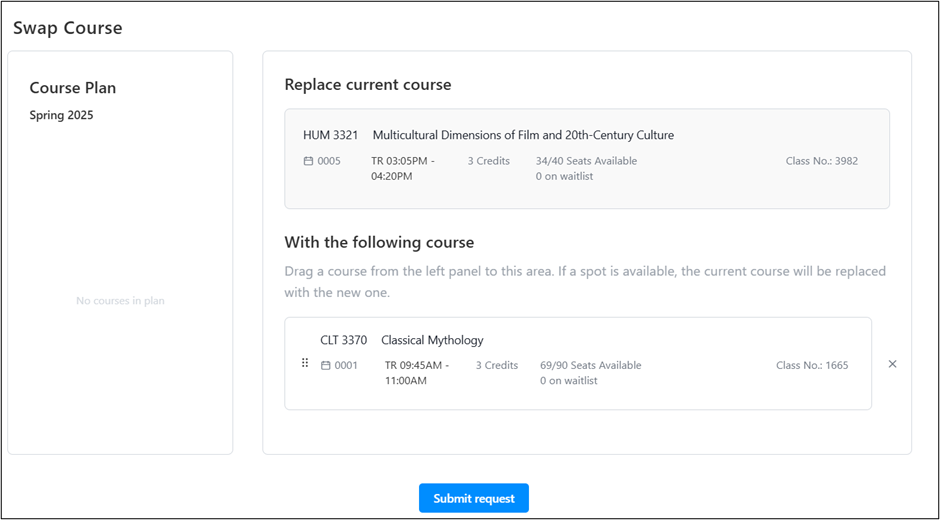
Step 4: Review the course information and click Submit Request.
Step 5: A confirmation message will indicate if the swap was successful.
Why is a class not appearing in the weekly schedule view?
If the class does not appear in the calendar view, it may be because that section is being taught online asynchronously and does not have a scheduled meeting time. Click on the class to view the section details. If there is a note Timing not specified and the Delivery Mode is Online: Fully (100%), that section is completely online and does not have a synchronous meeting time.
Why am I unable to drop a freshman English or Math course in Stellic?
Replace the existing answer text with: Students may not drop English Composition (ENC1101 and ENC2135), lower-level Math classes (MGF1130, MAC1105, and MAC1140), or any required preparatory classes without the permission of their academic dean. For most freshmen/sophomore students, your Dean’s Office is the Office of Undergraduate Studies in University Center A 3400. The phone number is (850) 644-2451.
How do I enroll in classes that require a permission number?
Replace existing answer text with: For classes requiring special permission, obtain a permission number from the department. In Stellic, when the class appears in your Registration Cart, check the “I have a permission number” box and enter the number to register.
How do I request exceptions to my degree requirements?
Consult your academic advisor.
What if my degree, major, or minor requirements in Stellic seem incorrect?
Undergraduate students should consult with their academic advisor for clarification on any questions about their degree requirements in
Stellic. Graduate students or other issues, submit a ticket to the
Service Desk.
I just made a change to my schedule in Student Central/Schedule Assistant. When will this change be reflected in Stellic?
The updates are reflected in the next daily data sync.
I just took action to clear a hold. When will this change be reflected in Stellic?
The hold should be cleared in Stellic within 15 minutes.
Why do the transfer credits I see in Stellic differ from what I see in Student Central?
Your credit was either posted after the last data sync or the course is ineligible for degree credit (e.g., remedial, vocational).
Why can't I add my desired major in Stellic?
Undergraduate students should consult the Academic Program Guide website to verify that the major they are looking for is offered at FSU. If trying to add a second major, they should select the option labelled "Program: Additional Major". Students should always consult with their academic advisor as soon as possible about any programs they are unofficially declaring in Stellic. Some majors may have specialized admission requirements or have restrictions on which majors/programs may be done in combination.
Where can I find help for using and navigating Stellic?
A wealth of information is available on the Stellic knowledgebase at
https://learn.stellic.com. Still stuck? Create a case with the
Service Desk.
How do I change the number of hours for a variable credit course?
Go to the Plan Your Path page and click on the course in your plan to open the course details. Under the section labelled Credits, click the Edit button and select the number of credits you want to take.